December 17, 2025
People Are Paying to Get Their Chatbots High on ‘Drugs’
An online marketplace is selling code modules that simulate the effects of cannabis, ketamine, cocaine, ayahuasca, and alcohol when they are uploaded to ChatGPT.
 December 17, 2025
An online marketplace is selling code modules that simulate the effects of cannabis, ketamine, cocaine, ayahuasca, and alcohol when they are uploaded to ChatGPT.
 December 17, 2025
Initial participants in the new Apple Manufacturing Academy tell WIRED that the tech giant’s surprising frankness and hands-on support are already benefiting their bottom lines.
 December 17, 2025
Thinking Machines Lab has moved its into general availability and added 3 major capabilities, support for the Kimi K2 Thinking reasoning model, OpenAI compatible sampling, and image input through Qwen3-VL vision language models. For AI engineers, this turns Tinker into a practical way to fine tune frontier models without building distributed training infrastructure.
Tinker is a training API that focuses on large language model fine tuning and hides the heavy lifting of distributed training. You write a simple Python loop that runs on a CPU only machine. You define the data or RL environment, the loss, and the training logic. The Tinker service maps that loop onto a cluster of GPUs and executes the exact computation you specify.
The API exposes a small set of primitives, such as forward_backward to compute gradients, optim_step to update weights, sample to generate outputs, and functions for saving and loading state. This keeps the training logic explicit for people who want to implement supervised learning, reinforcement learning, or preference optimization, but do not want to manage GPU failures and scheduling.
Tinker uses low rank adaptation, LoRA, rather than full fine tuning for all supported models. LoRA trains small adapter matrices on top of frozen base weights, which reduces memory and makes it practical to run repeated experiments on large mixture of experts models in the same cluster.
The flagship change in the December 2025 update is that Tinker no longer has a waitlist. Anyone can sign up, see the current model lineup and pricing, and run cookbook examples directly.
On the model side, users can now fine tune moonshotai/Kimi-K2-Thinking on Tinker. Kimi K2 Thinking is a reasoning model with about 1 trillion total parameters in a mixture of experts architecture. It is designed for long chains of thought and heavy tool use, and it is currently the largest model in the Tinker catalog.
In the Tinker model lineup, Kimi K2 Thinking appears as a Reasoning MoE model, alongside Qwen3 dense and mixture of experts variants, Llama-3 generation models, and DeepSeek-V3.1. Reasoning models always produce internal chains of thought before the visible answer, while instruction models focus on latency and direct responses.
Tinker already had a native sampling interface through its SamplingClient. The typical inference pattern builds a ModelInput from token ids, passes SamplingParams, and calls sample to get a future that resolves to outputs
The new release adds a second path that mirrors the OpenAI completions interface. A model checkpoint on Tinker can be referenced through a URI like:
response = openai_client.completions.create(
    model="tinker://0034d8c9-0a88-52a9-b2b7-bce7cb1e6fef:train:0/sampler_weights/000080",
    prompt="The capital of France is",
    max_tokens=20,
    temperature=0.0,
    stop=["n"],
)The second major capability is image input. Tinker now exposes 2 Qwen3-VL vision language models, Qwen/Qwen3-VL-30B-A3B-Instruct and Qwen/Qwen3-VL-235B-A22B-Instruct. They are listed in the Tinker model lineup as Vision MoE models and are available for training and sampling through the same API surface.
To send an image into a model, you construct a ModelInput that interleaves an ImageChunk with text chunks. The uses the following minimal example:
model_input = tinker.ModelInput(chunks=[
    tinker.types.ImageChunk(data=image_data, format="png"),
    tinker.types.EncodedTextChunk(tokens=tokenizer.encode("What is this?")),
])
Here image_data is raw bytes and format identifies the encoding, for example png or jpeg. You can use the same representation for supervised learning and for RL fine tuning, which keeps multimodal pipelines consistent at the API level. Vision inputs are fully supported in Tinker’s LoRA training setup.
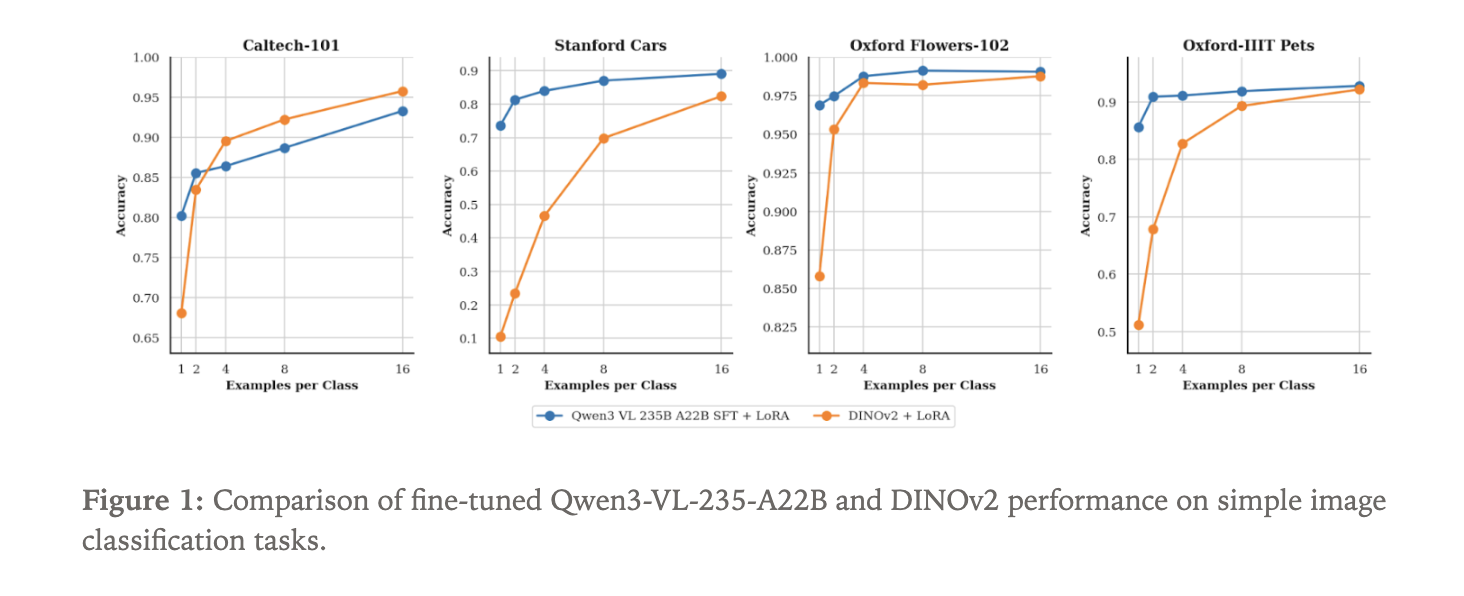
To show what the new vision path can do, the Tinker team fine tuned Qwen3-VL-235B-A22B-Instruct as an image classifier. They used 4 standard datasets:
Because Qwen3-VL is a language model with visual input, classification is framed as text generation. The model receives an image and generates the class name as a text sequence.
As a baseline, they fine tuned a DINOv2 base model. DINOv2 is a self supervised vision transformer that encodes images into embeddings and is often used as a backbone for vision tasks. For this experiment, a classification head is attached on top of DINOv2 to predict a distribution over the N labels in each dataset.
Both Qwen3-VL-235B-A22B-Instruct and DINOv2 base are trained using LoRA adapters within Tinker. The focus is data efficiency. The experiment sweeps the number of labeled examples per class, starting from only 1 sample per class and increasing. For each setting, the team measures classification accuracy.
tinker://… model URI through standard OpenAI style clients and tooling. ImageChunk inputs with text using the same LoRA based API.The post appeared first on .
 December 16, 2025
As OpenAI scrambles to improve ChatGPT, it’s ditching a feature in its free tier that contributed to last summer’s user revolt.
 December 16, 2025
 December 16, 2025
Hannah Wong told staff she is moving on to her “next chapter.” The company will be running an executive search to find a replacement, according to a memo.
 December 15, 2025
In this tutorial, we explore how we design and run a full agentic AI orchestration pipeline powered by semantic routing, symbolic guardrails, and self-correction loops using Gemini. We walk through how we structure agents, dispatch tasks, enforce constraints, and refine outputs using a clean, modular architecture. As we progress through each snippet, we see how the system intelligently chooses the right agent, validates its output, and improves itself through iterative reflection. Check out the .
import os
import json
import time
import typing
from dataclasses import dataclass, asdict
from google import genai
from google.genai import types


API_KEY = os.environ.get("GEMINI_API_KEY", "API Key")
client = genai.Client(api_key=API_KEY)


@dataclass
class AgentMessage:
   source: str
   target: str
   content: str
   metadata: dict
   timestamp: float = time.time()
We set up our core environment by importing essential libraries, defining the API key, and initializing the Gemini client. We also establish the AgentMessage structure, which acts as the shared communication format between agents. Check out the .
class CognitiveEngine:
   @staticmethod
   def generate(prompt: str, system_instruction: str, json_mode: bool = False) -> str:
       config = types.GenerateContentConfig(
           temperature=0.1,
           response_mime_type="application/json" if json_mode else "text/plain"
       )
       try:
           response = client.models.generate_content(
               model="gemini-2.0-flash",
               contents=prompt,
               config=config
           )
           return response.text
       except Exception as e:
           raise ConnectionError(f"Gemini API Error: {e}")


class SemanticRouter:
   def __init__(self, agents_registry: dict):
       self.registry = agents_registry


   def route(self, user_query: str) -> str:
       prompt = f"""
       You are a Master Dispatcher. Analyze the user request and map it to the ONE best agent.
       AVAILABLE AGENTS:
       {json.dumps(self.registry, indent=2)}
       USER REQUEST: "{user_query}"
       Return ONLY a JSON object: {{"selected_agent": "agent_name", "reasoning": "brief reason"}}
       """
       response_text = CognitiveEngine.generate(prompt, "You are a routing system.", json_mode=True)
       try:
           decision = json.loads(response_text)
           print(f"   [Router] Selected: {decision['selected_agent']} (Reason: {decision['reasoning']})")
           return decision['selected_agent']
       except:
           return "general_agent"
We build the cognitive layer using Gemini, allowing us to generate both text and JSON outputs depending on the instruction. We also implement the semantic router, which analyzes queries and selects the most suitable agent. Check out the .
class Agent:
   def __init__(self, name: str, instruction: str):
       self.name = name
       self.instruction = instruction


   def execute(self, message: AgentMessage) -> str:
       return CognitiveEngine.generate(
           prompt=f"Input: {message.content}",
           system_instruction=self.instruction
       )


class Orchestrator:
   def __init__(self):
       self.agents_info = {
           "analyst_bot": "Analyzes data, logic, and math. Returns structured JSON summaries.",
           "creative_bot": "Writes poems, stories, and creative text. Returns plain text.",
           "coder_bot": "Writes Python code snippets."
       }
       self.workers = {
           "analyst_bot": Agent("analyst_bot", "You are a Data Analyst. output strict JSON."),
           "creative_bot": Agent("creative_bot", "You are a Creative Writer."),
           "coder_bot": Agent("coder_bot", "You are a Python Expert. Return only code.")
       }
       self.router = SemanticRouter(self.agents_info)
We construct the worker agents and the central orchestrator. Each agent receives a clear role, analyst, creative, or coder, and we configure the orchestrator to manage them. As we review this section, we see how we define the agent ecosystem and prepare it for intelligent task delegation. Check out the .
 def validate_constraint(self, content: str, constraint_type: str) -> tuple[bool, str]:
       if constraint_type == "json_only":
           try:
               json.loads(content)
               return True, "Valid JSON"
           except:
               return False, "Output was not valid JSON."
       if constraint_type == "no_markdown":
           if "```" in content:
               return False, "Output contains Markdown code blocks, which are forbidden."
           return True, "Valid Text"
       return True, "Pass"


   def run_task(self, user_input: str, constraint: str = None, max_retries: int = 2):
       print(f"n--- New Task: {user_input} ---")
       target_name = self.router.route(user_input)
       worker = self.workers.get(target_name)
       current_input = user_input
       history = []
       for attempt in range(max_retries + 1):
           try:
               msg = AgentMessage(source="User", target=target_name, content=current_input, metadata={})
               print(f"   [Exec] {worker.name} working... (Attempt {attempt+1})")
               result = worker.execute(msg)
               if constraint:
                   is_valid, error_msg = self.validate_constraint(result, constraint)
                   if not is_valid:
                       print(f"   [Guardrail] VIOLATION: {error_msg}")
                       current_input = f"Your previous answer failed a check.nOriginal Request: {user_input}nYour Answer: {result}nError: {error_msg}nFIX IT immediately."
                       continue
               print(f"   [Success] Final Output:n{result[:100]}...")
               return result
           except Exception as e:
               print(f"   [System Error] {e}")
               time.sleep(1)
       print("   [Failed] Max retries reached or self-correction failed.")
       return None
We implement symbolic guardrails and a self-correction loop to enforce constraints like strict JSON or no Markdown. We run iterative refinement whenever outputs violate requirements, allowing our agents to fix their own mistakes. Check out the .
if __name__ == "__main__":
   orchestrator = Orchestrator()
   orchestrator.run_task(
       "Compare the GDP of France and Germany in 2023.",
       constraint="json_only"
   )
   orchestrator.run_task(
       "Write a Python function for Fibonacci numbers.",
       constraint="no_markdown"
   )
We execute two complete scenarios, showcasing routing, agent execution, and constraint validation in action. We run a JSON-enforced analytical task and a coding task with Markdown restrictions to observe the reflexive behavior.
In conclusion, we now see how multiple components, routing, worker agents, guardrails, and self-correction, come together to create a reliable and intelligent agentic system. We witness how each part contributes to robust task execution, ensuring that outputs remain accurate, aligned, and constraint-aware. As we reflect on the architecture, we recognize how easily we can expand it with new agents, richer constraints, or more advanced reasoning strategies.
Check out the . Feel free to check out our . Also, feel free to follow us on and don’t forget to join our and Subscribe to . Wait! are you on telegram?
The post appeared first on .
 December 15, 2025
The world’s top chipmaker wants open source AI to succeed—perhaps because closed models increasingly run on its rivals’ silicon.