Liquid AI’s LFM2-2.6B-Exp Uses Pure Reinforcement Learning RL And Dynamic Hybrid Reasoning To Tighten Small Model Behavior

Liquid AI’s LFM2-2.6B-Exp Uses Pure Reinforcement Learning RL And Dynamic Hybrid Reasoning To Tighten Small Model Behavior


Liquid AI has introduced LFM2-2.6B-Exp, an experimental checkpoint of its LFM2-2.6B language model that is trained with pure reinforcement learning on top of the existing LFM2 stack. The goal is simple, improve instruction following, knowledge tasks, and math for a small 3B class model that still targets on device and edge deployment.

Where LFM2-2.6B-Exp Fits in the LFM2 Family?

LFM2 is the second generation of Liquid Foundation Models. It is designed for efficient deployment on phones, laptops, and other edge devices. Liquid AI describes LFM2 as a hybrid model that combines short range LIV convolution blocks with grouped query attention blocks, controlled by multiplicative gates.

The family includes 4 dense sizes, LFM2-350M, LFM2-700M, LFM2-1.2B, and LFM2-2.6B. All share a context length of 32,768 tokens, a vocabulary size of 65,536, and bfloat16 precision. The 2.6B model uses 30 layers, with 22 convolution layers and 8 attention layers. Each size is trained on a 10 trillion token budget.

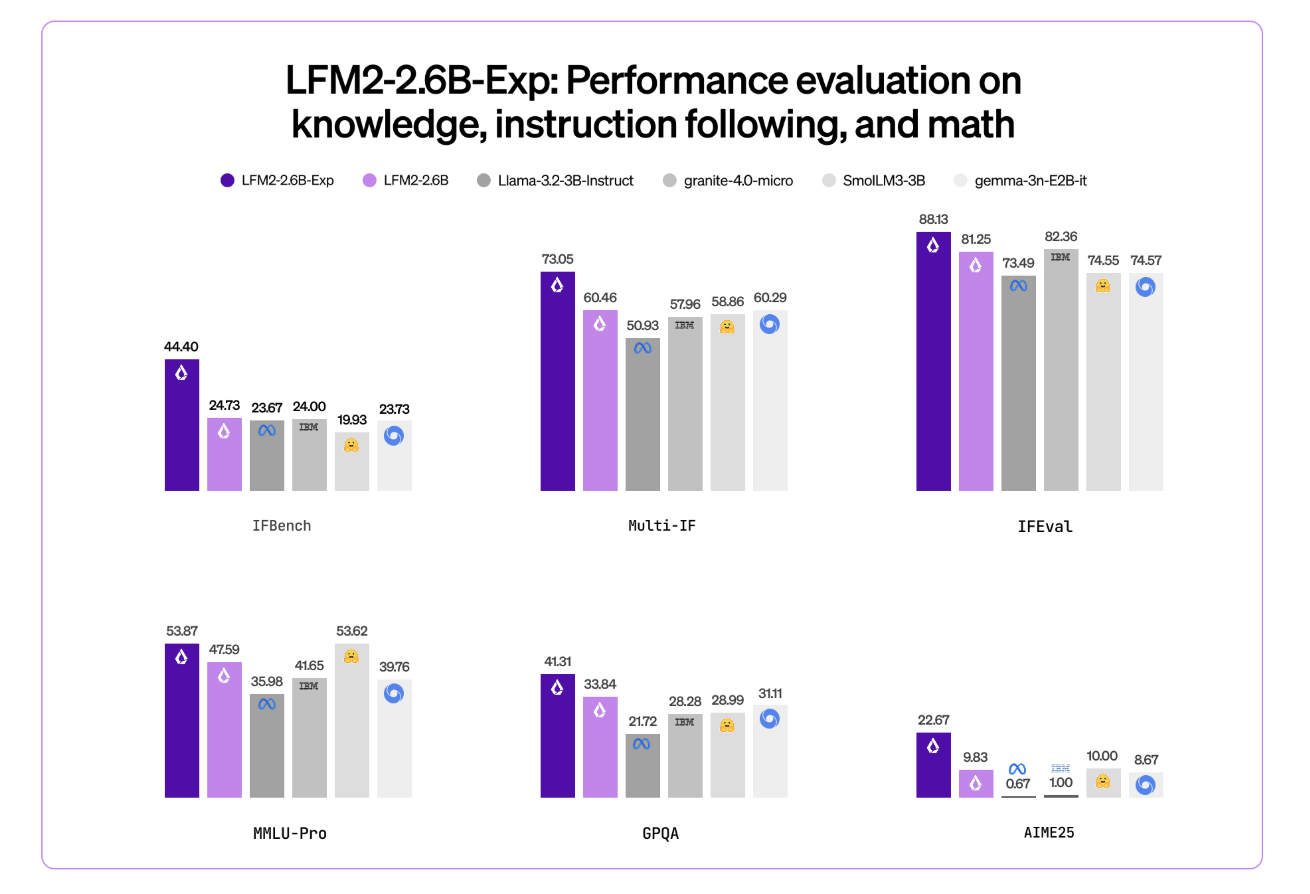
LFM2-2.6B is already positioned as a high efficiency model. It reaches 82.41 percent on GSM8K and 79.56 percent on IFEval. This places it ahead of several 3B class models such as Llama 3.2 3B Instruct, Gemma 3 4B it, and SmolLM3 3B on these benchmarks.

LFM2-2.6B-Exp keeps this architecture. It reuses the same tokenization, context window, and hardware profile. The checkpoint focuses only on changing behavior through a reinforcement learning stage.

https://huggingface.co/LiquidAI/LFM2-2.6B-Exp

Pure RL on Top of a Pretrained, Aligned Base

This checkpoint is built on LFM2-2.6B using pure reinforcement learning. It is specifically trained on instruction following, knowledge, and math.

The underlying LFM2 training stack combines several stages. It includes very large scale supervised fine tuning on a mix of downstream tasks and general domains, custom Direct Preference Optimization with length normalization, iterative model merging, and reinforcement learning with verifiable rewards.

But exactly ‘pure reinforcement learning’ means? LFM2-2.6B-Exp starts from the existing LFM2-2.6B checkpoint and then goes through a sequential RL training schedule. It begin with instruction following, then extend RL training to knowledge oriented prompts, math, and a small amount of tool use, without an additional SFT warm up or distillation step in that final phase.

The important point is that LFM2-2.6B-Exp does not change the base architecture or pre training. It changes the policy through an RL stage that uses verifiable rewards, on a targeted set of domains, on top of a model that is already supervised and preference aligned.

Benchmark Signal, Especially On IFBench

Liquid AI team highlights IFBench as the main headline metric. IFBench is an instruction following benchmark that checks how reliably a model follows complex, constrained instructions. On this benchmark, LFM2-2.6B-Exp surpasses DeepSeek R1-0528, which is reported as 263 times larger in parameter count.

LFM2 models provide strong performance across a standard set of benchmarks such as MMLU, GPQA, IFEval, GSM8K, and related suites. The 2.6B base model already competes well in the 3B segment. The RL checkpoint then pushes instruction following and math further, while staying in the same 3B parameter budget.

Architecture and Capabilities that Matters

The architecture uses 10 double gated short range LIV convolution blocks and 6 grouped query attention blocks, arranged in a hybrid stack. This design reduces KV cache cost and keeps inference fast on consumer GPUs and NPUs.

The pre training mixture uses roughly 75 percent English, 20 percent multilingual data, and 5 percent code. The supported languages include English, Arabic, Chinese, French, German, Japanese, Korean, and Spanish.

LFM2 models expose a ChatML like template and native tool use tokens. Tools are described as JSON between dedicated tool list markers. The model then emits Python like calls between tool call markers and reads tool responses between tool response markers. This structure makes the model suitable as the agent core for tool calling stacks without custom prompt engineering.

LFM2-2.6B, and by extension LFM2-2.6B-Exp, is also the only model in the family that enables dynamic hybrid reasoning through special think tokens for complex or multilingual inputs. That capability remains available because the RL checkpoint does not change tokenization or architecture.

Key Takeaways

  1. LFM2-2.6B-Exp is an experimental checkpoint of LFM2-2.6B that adds a pure reinforcement learning stage on top of a pretrained, supervised and preference aligned base, targeted at instruction following, knowledge tasks, and math.
  2. The LFM2-2.6B backbone uses a hybrid architecture that combines double gated short range LIV convolution blocks and grouped query attention blocks, with 30 layers, 22 convolution layers and 8 attention layers, 32,768 token context length, and a 10 trillion token training budget at 2.6B parameters.
  3. LFM2-2.6B already achieves strong benchmark scores in the 3B class, around 82.41 percent on GSM8K and 79.56 percent on IFEval, and the LFM2-2.6B-Exp RL checkpoint further improves instruction following and math performance without changing the architecture or memory profile.
  4. Liquid AI reports that on IFBench, an instruction following benchmark, LFM2-2.6B-Exp surpasses DeepSeek R1-0528 even though the latter has many more parameters, which shows a strong performance per parameter for constrained deployment settings.
  5. LFM2-2.6B-Exp is released on Hugging Face with open weights under the LFM Open License v1.0 and is supported through Transformers, vLLM, llama.cpp GGUF quantizations, and ONNXRuntime, making it suitable for agentic systems, structured data extraction, retrieval augmented generation, and on device assistants where a compact 3B model is required.

Check out the . Also, feel free to follow us on  and don’t forget to join our  and Subscribe to . Wait! are you on telegram? 

The post appeared first on .

Read More

From Gemma 3 270M to FunctionGemma, How Google AI Built a Compact Function Calling Specialist for Edge Workloads


Google has released FunctionGemma, a specialized version of the Gemma 3 270M model that is trained specifically for function calling and designed to run as an edge agent that maps natural language to executable API actions.

But, What is FunctionGemma?

FunctionGemma is a 270M parameter text only transformer based on Gemma 3 270M. It keeps the same architecture as Gemma 3 and is released as an open model under the Gemma license, but the training objective and chat format are dedicated to function calling rather than free form dialogue.

The model is intended to be fine tuned for specific function calling tasks. It is not positioned as a general chat assistant. The primary design goal is to translate user instructions and tool definitions into structured function calls, then optionally summarize tool responses for the user.

From an interface perspective, FunctionGemma is presented as a standard causal language model. Inputs and outputs are text sequences, with an input context of 32K tokens and an output budget of up to 32K tokens per request, shared with the input length.

Architecture and training data

The model uses the Gemma 3 transformer architecture and the same 270M parameter scale as Gemma 3 270M. The training and runtime stack reuse the research and infrastructure used for Gemini, including JAX and ML Pathways on large TPU clusters.

FunctionGemma uses Gemma’s 256K vocabulary, which is optimized for JSON structures and multilingual text. This improves token efficiency for function schemas and tool responses and reduces sequence length for edge deployments where latency and memory are tight.

The model is trained on 6T tokens, with a knowledge cutoff in August 2024. The dataset focuses on two main categories:

  • public tool and API definitions
  • tool use interactions that include prompts, function calls, function responses and natural language follow up messages that summarize outputs or request clarification

This training signal teaches both syntax, which function to call and how to format arguments, and intent, when to call a function and when to ask for more information.

Conversation format and control tokens

FunctionGemma does not use a free form chat format. It expects a strict conversation template that separates roles and tool related regions. Conversation turns are wrapped with <start_of_turn>role ... <end_of_turn> where roles are typically developer, user or model.

Within those turns, FunctionGemma relies on a fixed set of control token pairs

  • <start_function_declaration> and <end_function_declaration> for tool definitions
  • <start_function_call> and <end_function_call> for the model’s tool calls
  • <start_function_response> and <end_function_response> for serialized tool outputs

These markers let the model distinguish natural language text from function schemas and from execution results. The Hugging Face apply_chat_template API and the official Gemma templates generate this structure automatically for messages and tool lists.

Fine tuning and Mobile Actions performance

Out of the box, FunctionGemma is already trained for generic tool use. However, the official Mobile Actions guide and the model card emphasize that small models reach production level reliability only after task specific fine tuning.

The Mobile Actions demo uses a dataset where each example exposes a small set of tools for Android system operations, for example create a contact, set a calendar event, control the flashlight and map viewing. FunctionGemma learns to map utterances such as ‘Create a calendar event for lunch tomorrow’ or ‘Turn on the flashlight’ to those tools with structured arguments.

On the Mobile Actions evaluation, the base FunctionGemma model reaches 58 percent accuracy on a held out test set. After fine tuning with the public cookbook recipe, accuracy increases to 85 percent.

Edge agents and reference demos

The main deployment target for FunctionGemma is edge agents that run locally on phones, laptops and small accelerators such as NVIDIA Jetson Nano. The small parameter count, 0.3B, and support for quantization allow inference with low memory and low latency on consumer hardware.

Google ships several reference experiences through the Google AI Edge Gallery

  • Mobile Actions shows a fully offline assistant style agent for device control using FunctionGemma fine tuned on the Mobile Actions dataset and deployed on device.
  • Tiny Garden is a voice controlled game where the model decomposes commands such as “Plant sunflowers in the top row and water them” into domain specific functions like plant_seed and water_plots with explicit grid coordinates.
  • FunctionGemma Physics Playground runs entirely in the browser using Transformers.js and lets users solve physics puzzles via natural language instructions that the model converts into simulation actions.

These demos validate that a 270M parameter function caller can support multi step logic on device without server calls, given appropriate fine tuning and tool interfaces.

Key Takeaways

  1. FunctionGemma is a 270M parameter, text only variant of Gemma 3 that is trained specifically for function calling, not for open ended chat, and is released as an open model under the Gemma terms of use.
  2. The model keeps the Gemma 3 transformer architecture and 256k token vocabulary, supports 32k tokens per request shared between input and output, and is trained on 6T tokens.
  3. FunctionGemma uses a strict chat template with <start_of_turn>role ... <end_of_turn> and dedicated control tokens for function declarations, function calls and function responses, which is required for reliable tool use in production systems.
  4. On the Mobile Actions benchmark, accuracy improves from 58 percent for the base model to 85 percent after task specific fine tuning, showing that small function callers need domain data more than prompt engineering.
  5. The 270M scale and quantization support let FunctionGemma run on phones, laptops and Jetson class devices, and the model is already integrated into ecosystems such as Hugging Face, Vertex AI, LM Studio and edge demos like Mobile Actions, Tiny Garden and the Physics Playground.

Check out the  and  Also, feel free to follow us on  and don’t forget to join our  and Subscribe to . Wait! are you on telegram? 

The post appeared first on .

Read More

A Coding Implementation on Building Self-Organizing Zettelkasten Knowledge Graphs and Sleep-Consolidation Mechanisms


In this tutorial, we dive into the cutting edge of Agentic AI by building a “Zettelkasten” memory system, a “living” architecture that organizes information much like the human brain. We move beyond standard retrieval methods to construct a dynamic knowledge graph where an agent autonomously decomposes inputs into atomic facts, links them semantically, and even “sleeps” to consolidate memories into higher-order insights. Using Google’s Gemini, we implement a robust solution that addresses real-world API constraints, ensuring our agent stores data and also actively understands the evolving context of our projects. Check out the .

!pip install -q -U google-generativeai networkx pyvis scikit-learn numpy


import os
import json
import uuid
import time
import getpass
import random
import networkx as nx
import numpy as np
import google.generativeai as genai
from dataclasses import dataclass, field
from typing import List
from sklearn.metrics.pairwise import cosine_similarity
from IPython.display import display, HTML
from pyvis.network import Network
from google.api_core import exceptions


def retry_with_backoff(func, *args, **kwargs):
   max_retries = 5
   base_delay = 5
  
   for attempt in range(max_retries):
       try:
           return func(*args, **kwargs)
       except exceptions.ResourceExhausted:
           wait_time = base_delay * (2 ** attempt) + random.uniform(0, 1)
           print(f"   ⏳ Quota limit hit. Cooling down for {wait_time:.1f}s...")
           time.sleep(wait_time)
       except Exception as e:
           if "429" in str(e):
               wait_time = base_delay * (2 ** attempt) + random.uniform(0, 1)
               print(f"   ⏳ Quota limit hit (HTTP 429). Cooling down for {wait_time:.1f}s...")
               time.sleep(wait_time)
           else:
               print(f"   ⚠ Unexpected Error: {e}")
               return None
   print("   ❌ Max retries reached.")
   return None


print("Enter your Google AI Studio API Key (Input will be hidden):")
API_KEY = getpass.getpass()


genai.configure(api_key=API_KEY)
MODEL_NAME = "gemini-2.5-flash" 
EMBEDDING_MODEL = "models/text-embedding-004"


print(f"✅ API Key configured. Using model: {MODEL_NAME}")

We begin by importing essential libraries for graph management and AI model interaction, while also securing our API key input. Crucially, we define a robust retry_with_backoff function that automatically handles rate limit errors, ensuring our agent gracefully pauses and recovers when the API quota is exceeded during heavy processing. Check out the .

@dataclass
class MemoryNode:
   id: str
   content: str
   type: str
   embedding: List[float] = field(default_factory=list)
   timestamp: int = 0


class RobustZettelkasten:
   def __init__(self):
       self.graph = nx.Graph()
       self.model = genai.GenerativeModel(MODEL_NAME)
       self.step_counter = 0


   def _get_embedding(self, text):
       result = retry_with_backoff(
           genai.embed_content,
           model=EMBEDDING_MODEL,
           content=text
       )
       return result['embedding'] if result else [0.0] * 768

We define the fundamental MemoryNode structure to hold our content, types, and vector embeddings in an organized data class. We then initialize the main RobustZettelkasten class, establishing the network graph and configuring the Gemini embedding model that serves as the backbone of our semantic search capabilities. Check out the .

def _atomize_input(self, text):
       prompt = f"""
       Break the following text into independent atomic facts.
       Output JSON: {{ "facts": ["fact1", "fact2"] }}
       Text: "{text}"
       """
       response = retry_with_backoff(
           self.model.generate_content,
           prompt,
           generation_config={"response_mime_type": "application/json"}
       )
       try:
           return json.loads(response.text).get("facts", []) if response else [text]
       except:
           return [text]


   def _find_similar_nodes(self, embedding, top_k=3, threshold=0.45):
       if not self.graph.nodes: return []
      
       nodes = list(self.graph.nodes(data=True))
       embeddings = [n[1]['data'].embedding for n in nodes]
       valid_embeddings = [e for e in embeddings if len(e) > 0]
      
       if not valid_embeddings: return []


       sims = cosine_similarity([embedding], embeddings)[0]
       sorted_indices = np.argsort(sims)[::-1]
      
       results = []
       for idx in sorted_indices[:top_k]:
           if sims[idx] > threshold:
               results.append((nodes[idx][0], sims[idx]))
       return results


   def add_memory(self, user_input):
       self.step_counter += 1
       print(f"n🧠 [Step {self.step_counter}] Processing: "{user_input}"")
      
       facts = self._atomize_input(user_input)
      
       for fact in facts:
           print(f"   -> Atom: {fact}")
           emb = self._get_embedding(fact)
           candidates = self._find_similar_nodes(emb)
          
           node_id = str(uuid.uuid4())[:6]
           node = MemoryNode(id=node_id, content=fact, type='fact', embedding=emb, timestamp=self.step_counter)
           self.graph.add_node(node_id, data=node, title=fact, label=fact[:15]+"...")
          
           if candidates:
               context_str = "n".join([f"ID {c[0]}: {self.graph.nodes[c[0]]['data'].content}" for c in candidates])
               prompt = f"""
               I am adding: "{fact}"
               Existing Memory:
               {context_str}
              
               Are any of these directly related? If yes, provide the relationship label.
               JSON: {{ "links": [{{ "target_id": "ID", "rel": "label" }}] }}
               """
               response = retry_with_backoff(
                   self.model.generate_content,
                   prompt,
                   generation_config={"response_mime_type": "application/json"}
               )
              
               if response:
                   try:
                       links = json.loads(response.text).get("links", [])
                       for link in links:
                           if self.graph.has_node(link['target_id']):
                               self.graph.add_edge(node_id, link['target_id'], label=link['rel'])
                               print(f"      🔗 Linked to {link['target_id']} ({link['rel']})")
                   except:
                       pass
          
           time.sleep(1)

We construct an ingestion pipeline that decomposes complex user inputs into atomic facts to prevent information loss. We immediately embed these facts and use our agent to identify and create semantic links to existing nodes, effectively building a knowledge graph in real time that mimics associative memory. Check out the .

def consolidate_memory(self):
       print(f"n💤 [Consolidation Phase] Reflecting...")
       high_degree_nodes = [n for n, d in self.graph.degree() if d >= 2]
       processed_clusters = set()


       for main_node in high_degree_nodes:
           neighbors = list(self.graph.neighbors(main_node))
           cluster_ids = tuple(sorted([main_node] + neighbors))
          
           if cluster_ids in processed_clusters: continue
           processed_clusters.add(cluster_ids)
          
           cluster_content = [self.graph.nodes[n]['data'].content for n in cluster_ids]
          
           prompt = f"""
           Generate a single high-level insight summary from these facts.
           Facts: {json.dumps(cluster_content)}
           JSON: {{ "insight": "Your insight here" }}
           """
           response = retry_with_backoff(
               self.model.generate_content,
               prompt,
               generation_config={"response_mime_type": "application/json"}
           )
          
           if response:
               try:
                   insight_text = json.loads(response.text).get("insight")
                   if insight_text:
                       insight_id = f"INSIGHT-{uuid.uuid4().hex[:4]}"
                       print(f"   ✨ Insight: {insight_text}")
                       emb = self._get_embedding(insight_text)
                      
                       insight_node = MemoryNode(id=insight_id, content=insight_text, type='insight', embedding=emb)
                       self.graph.add_node(insight_id, data=insight_node, title=f"INSIGHT: {insight_text}", label="INSIGHT", color="#ff7f7f")
                       self.graph.add_edge(insight_id, main_node, label="abstracted_from")
               except:
                   continue
           time.sleep(1)


   def answer_query(self, query):
       print(f"n🔍 Querying: "{query}"")
       emb = self._get_embedding(query)
       candidates = self._find_similar_nodes(emb, top_k=2)
      
       if not candidates:
           print("No relevant memory found.")
           return


       relevant_context = set()
       for node_id, score in candidates:
           node_content = self.graph.nodes[node_id]['data'].content
           relevant_context.add(f"- {node_content} (Direct Match)")
           for n1 in self.graph.neighbors(node_id):
               rel = self.graph[node_id][n1].get('label', 'related')
               content = self.graph.nodes[n1]['data'].content
               relevant_context.add(f"  - linked via '{rel}' to: {content}")
              
       context_text = "n".join(relevant_context)
       prompt = f"""
       Answer based ONLY on context.
       Question: {query}
       Context:
       {context_text}
       """
       response = retry_with_backoff(self.model.generate_content, prompt)
       if response:
           print(f"🤖 Agent Answer:n{response.text}")

We implement the cognitive functions of our agent, enabling it to “sleep” and consolidate dense memory clusters into higher-order insights. We also define the query logic that traverses these connected paths, allowing the agent to reason across multiple hops in the graph to answer complex questions. Check out the .

def show_graph(self):
       try:
           net = Network(notebook=True, cdn_resources='remote', height="500px", width="100%", bgcolor='#222222', font_color='white')
           for n, data in self.graph.nodes(data=True):
               color = "#97c2fc" if data['data'].type == 'fact' else "#ff7f7f"
               net.add_node(n, label=data.get('label', ''), title=data['data'].content, color=color)
           for u, v, data in self.graph.edges(data=True):
               net.add_edge(u, v, label=data.get('label', ''))
           net.show("memory_graph.html")
           display(HTML("memory_graph.html"))
       except Exception as e:
           print(f"Graph visualization error: {e}")


brain = RobustZettelkasten()


events = [
   "The project 'Apollo' aims to build a dashboard for tracking solar panel efficiency.",
   "We chose React for the frontend because the team knows it well.",
   "The backend must be Python to support the data science libraries.",
   "Client called. They are unhappy with React performance on low-end devices.",
   "We are switching the frontend to Svelte for better performance."
]


print("--- PHASE 1: INGESTION ---")
for event in events:
   brain.add_memory(event)
   time.sleep(2)


print("--- PHASE 2: CONSOLIDATION ---")
brain.consolidate_memory()


print("--- PHASE 3: RETRIEVAL ---")
brain.answer_query("What is the current frontend technology for Apollo and why?")


print("--- PHASE 4: VISUALIZATION ---")
brain.show_graph()

We wrap up by adding a visualization method that generates an interactive HTML graph of our agent’s memory, allowing us to inspect the nodes and edges. Finally, we execute a test scenario involving a project timeline to verify that our system correctly links concepts, generates insights, and retrieves the right context.

In conclusion, we now have a fully functional “Living Memory” prototype that transcends simple database storage. By enabling our agent to actively link related concepts and reflect on its experiences during a “consolidation” phase, we solve the critical problem of fragmented context in long-running AI interactions. This system demonstrates that true intelligence requires processing power and a structured, evolving memory, marking the way for us to build more capable, personalized autonomous agents.


Check out the . Also, feel free to follow us on  and don’t forget to join our  and Subscribe to . Wait! are you on telegram? 

The post appeared first on .

Read More
MiniMax Releases M2.1: An Enhanced M2 Version with Features like Multi-Coding Language Support, API Integration, and Improved Tools for Structured Coding

MiniMax Releases M2.1: An Enhanced M2 Version with Features like Multi-Coding Language Support, API Integration, and Improved Tools for Structured Coding


Just months after releasing M2—a fast, low-cost model designed for agents and code—MiniMax has introduced an enhanced version: MiniMax M2.1.

M2 already stood out for its efficiency, running at roughly 8% of the cost of Claude Sonnet while delivering significantly higher speed. More importantly, it introduced a different computational and reasoning pattern, particularly in how the model structures and executes its thinking during complex code and tool-driven workflows.

M2.1 builds on this foundation, bringing tangible improvements across key areas: better code quality, smarter instruction following, cleaner reasoning, and stronger performance across multiple programming languages. These upgrades extend the original strengths of M2 while staying true to MiniMax’s vision of “Intelligence with Everyone.

Strengthening the core capabilities of M2, M2.1 is no longer just about better coding—it also produces clearer, more structured outputs across conversations, documentation, and writing.

Core Capabilities and Benchmark Results

  • Built for real-world coding and AI-native teams: Designed to support everything from rapid “vibe builds” to complex, production-grade workflows.
  • Goes beyond coding: Produces clearer, more structured, and higher-quality outputs across everyday conversations, technical documentation, and writing tasks.
  • State-of-the-art multilingual coding performance: Achieves 72.5% on SWE-Multilingual, outperforming Claude Sonnet 4.5 and Gemini 3 Pro across multiple programming languages.
  • Strong AppDev & WebDev capabilities: Scores 88.6% on VIBE-Bench, exceeding Claude Sonnet 4.5 and Gemini 3 Pro, with major improvements in native Android, iOS, and modern web development.
  • Excellent agent and tool compatibility: Delivers consistent and stable performance across leading coding tools and agent frameworks, including Claude Code, Droid (Factory AI), Cline, Kilo Code, Roo Code, BlackBox, and more.
  • Robust context management support: Works reliably with advanced context mechanisms such as Skill.md, Claude.md / agent.md / cursorrule, and Slash Commands, enabling scalable agent workflows.
  • Automatic caching, zero configuration: Built-in caching works out of the box to reduce latency, lower costs, and deliver a smoother overall experience.

Getting Started with MiniMax M2.1

To get started with MiniMax M2.1, you’ll need an API key from the . You can generate one from the MiniMax user console.

Once issued, store the API key securely and avoid exposing it in code repositories or public environments.

Installing & Setting up the dependencies

MiniMax supports both the Anthropic and OpenAI API formats, making it easy to integrate MiniMax models into existing workflows with minimal configuration changes—whether you’re using Anthropic-style message APIs or OpenAI-compatible setups.

pip install anthropic
import os
from getpass import getpass
os.environ['ANTHROPIC_BASE_URL'] = 'https://api.minimax.io/anthropic'
os.environ['ANTHROPIC_API_KEY'] = getpass('Enter MiniMax API Key: ')

With just this minimal setup, you’re ready to start using the model.

Sending Requests to the Model

MiniMax M2.1 returns structured outputs that separate internal reasoning (thinking) from the final response (text). This allows you to observe how the model interprets intent and plans its answer before producing the user-facing output.

import anthropic

client = anthropic.Anthropic()

message = client.messages.create(
    model="MiniMax-M2.1",
    max_tokens=1000,
    system="You are a helpful assistant.",
    messages=[
        {
            "role": "user",
            "content": [
                {
                    "type": "text",
                    "text": "Hi, how are you?"
                }
            ]
        }
    ]
)

for block in message.content:
    if block.type == "thinking":
        print(f"Thinking:n{block.thinking}n")
    elif block.type == "text":
        print(f"Text:n{block.text}n")
Thinking:
The user is just asking how I am doing. This is a friendly greeting, so I should respond in a warm, conversational way. I'll keep it simple and friendly.

Text:
Hi! I'm doing well, thanks for asking! 😊

I'm ready to help you with whatever you need today. Whether it's coding, answering questions, brainstorming ideas, or just chatting, I'm here for you.

What can I help you with?

What makes MiniMax stand out is the visibility into its reasoning process. Before producing the final response, the model explicitly reasons about the user’s intent, tone, and expected style—ensuring the answer is appropriate and context-aware. 

By cleanly separating reasoning from responses, the model becomes easier to interpret, debug, and trust, especially in complex agent-based or multi-step workflows, and with M2.1 this clarity is paired with faster responses, more concise reasoning, and substantially reduced token consumption compared to M2.

Testing the Model’s Coding Capabilities

MiniMax M2 stands out for its native mastery of Interleaved Thinking, allowing it to dynamically plan and adapt within complex coding and tool-based workflows, and M2.1 extends this capability with improved code quality, more precise instruction following, clearer reasoning, and stronger performance across programming languages—particularly in handling composite instruction constraints as seen in OctoCodingBench—making it ready for office automation.

To evaluate these capabilities in practice, let’s test the model using a structured coding prompt that includes multiple constraints and real-world engineering requirements.

import anthropic

client = anthropic.Anthropic()

def run_test(prompt: str, title: str):
    print(f"n{'='*80}")
    print(f"TEST: {title}")
    print(f"{'='*80}n")

    message = client.messages.create(
        model="MiniMax-M2.1",
        max_tokens=10000,
        system=(
            "You are a senior software engineer. "
            "Write production-quality code with clear structure, "
            "explicit assumptions, and minimal but sufficient reasoning. "
            "Avoid unnecessary verbosity."
        ),
        messages=[
            {
                "role": "user",
                "content": [{"type": "text", "text": prompt}]
            }
        ]
    )

    for block in message.content:
        if block.type == "thinking":
            print("🧠 Thinking:n", block.thinking, "n")
        elif block.type == "text":
            print("📄 Output:n", block.text, "n")

PROMPT= """
Design a small Python service that processes user events.

Requirements:
1. Events arrive as dictionaries with keys: user_id, event_type, timestamp.
2. Validate input strictly (types + required keys).
3. Aggregate events per user in memory.
4. Expose two functions:
   - ingest_event(event: dict) -> None
   - get_user_summary(user_id: str) -> dict
5. Code must be:
   - Testable
   - Thread-safe
   - Easily extensible for new event types
6. Do NOT use external libraries.

Provide:
- Code only
- Brief inline comments where needed
"""

run_test(prompt=PROMPT, title="Instruction Following + Architecture")

This test uses a deliberately structured and constraint-heavy prompt designed to evaluate more than just code generation. The prompt requires strict input validation, in-memory state management, thread safety, testability, and extensibility—all without relying on external libraries.

By combining architectural decisions with multiple non-trivial constraints, the prompt operates at a medium-to-high complexity level, making it well-suited for assessing how effectively MiniMax M2.1 follows instructions, reasons through design trade-offs, and produces production-quality code rather than isolated snippets.

Model Reasoning & Output

The model reasons through key architectural trade-offs before coding, carefully balancing flexibility, memory usage, and extensibility. It evaluates multiple approaches to event aggregation and deliberately chooses raw event storage to enable future extensions without modifying ingestion logic. 

Thread safety is explicitly handled through locking, and strict input validation is planned to ensure data correctness, reflecting a real-world, engineering-first mindset rather than jumping straight to implementation.

This thoughtful reasoning is reflected in the final output, which demonstrates strong code quality through clear structure, meaningful naming, type hints, and a thread-safe design aligned with production standards. The solution follows all prompt constraints accurately—covering validation, in-memory aggregation, extensibility, and the absence of external dependencies—while maintaining clean, focused logic that avoids unnecessary complexity and remains easy to maintain.

import threading
from typing import Dict, List, Any

class EventProcessor:
    """
    Thread-safe event processor that aggregates user events in memory.
    Validates input strictly and supports easy extension for new event types.
    """
    
    def __init__(self) -> None:
        # Stores events per user: user_id -> list of event dictionaries
        self._user_events: Dict[str, List[Dict[str, Any]]] = {}
        # Lock for thread-safe access
        self._lock = threading.Lock()
    
    def ingest_event(self, event: dict) -> None:
        """
        Validate and ingest a single event.
        Strictly validates types and presence of required keys.
        """
        # Validate event is a dictionary
        if not isinstance(event, dict):
            raise ValueError("Event must be a dictionary")
        
        # Validate required keys and their types
        required_keys = {
            'user_id': str,
            'event_type': str,
            'timestamp': (str, int, float)  # Accept string or numeric timestamp
        }
        
        for key, expected_type in required_keys.items():
            if key not in event:
                raise ValueError(f"Missing required key: '{key}'")
            if not isinstance(event[key], expected_type):
                raise ValueError(f"Key '{key}' must be of type {expected_type.__name__}")
        
        # Thread-safe event storage
        with self._lock:
            user_id = event['user_id']
            if user_id not in self._user_events:
                self._user_events[user_id] = []
            self._user_events[user_id].append(event)
    
    def get_user_summary(self, user_id: str) -> dict:
        """
        Generate summary for a specific user.
        Returns aggregated event counts and timestamps.
        """
        if not isinstance(user_id, str):
            raise ValueError("user_id must be a string")
        
        with self._lock:
            user_events = self._user_events.get(user_id, [])
            
            # Aggregate event counts
            event_counts = {}
            timestamps = []
            
            for event in user_events:
                event_type = event['event_type']
                event_counts[event_type] = event_counts.get(event_type, 0) + 1
                timestamps.append(event['timestamp'])
            
            return {
                'user_id': user_id,
                'total_events': len(user_events),
                'event_counts': event_counts,
                'timestamps': sorted(timestamps) if timestamps else []
            }
```

**Key Design Choices:**

1. **Thread Safety**: Uses `threading.Lock` to protect shared state during concurrent access
2. **Input Validation**: Strict type checking for required keys with clear error messages
3. **Extensibility**: 
   - New event types automatically handled by dynamic counting
   - Easy to add new aggregations in `get_user_summary`
4. **Testability**: Clear separation of concerns, easy to mock for unit tests
5. **Memory Efficiency**: Stores only essential data (event dictionaries)

**Usage Example:**
```python
processor = EventProcessor()

# Ingest events
processor.ingest_event({
    'user_id': 'user123',
    'event_type': 'login',
    'timestamp': '2023-01-01T10:00:00Z'
})

# Get user summary
summary = processor.get_user_summary('user123')
print(summary)

Model’s Interleaved Thinking in Action

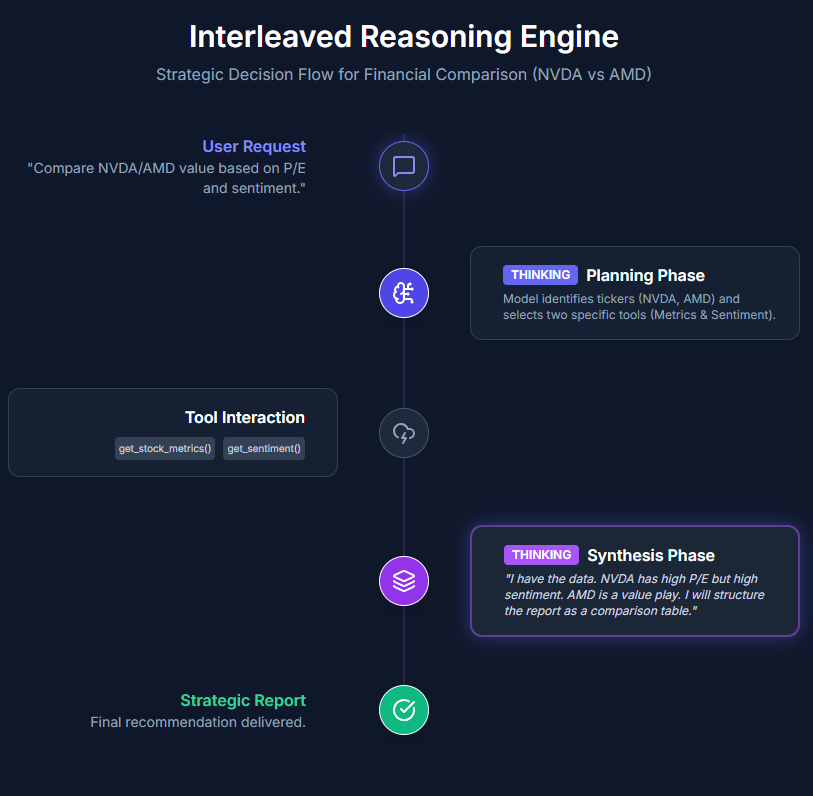
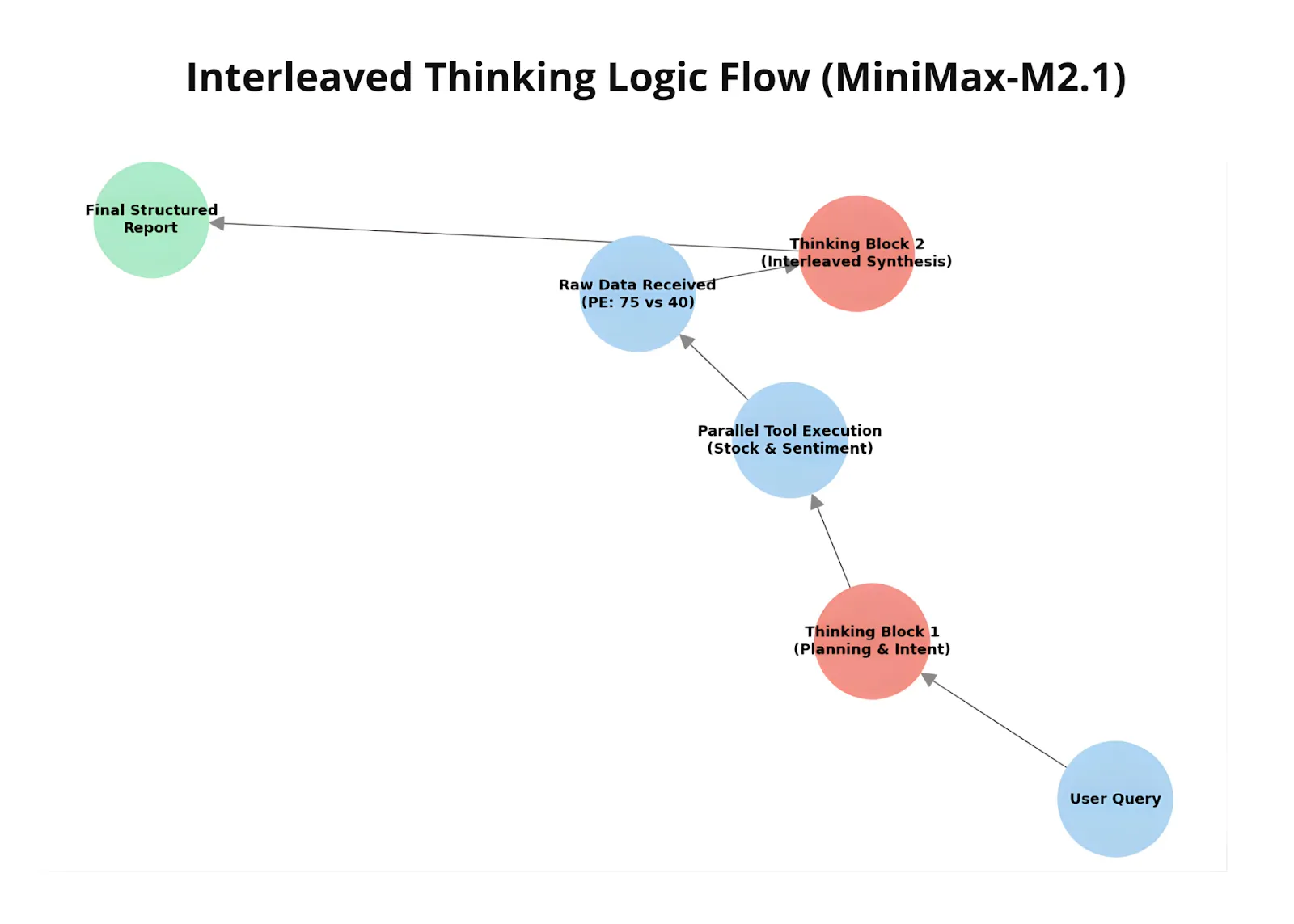
Let’s now see MiniMax M2.1’s interleaved thinking in action. We ask the model to compare two organizations based on P/E ratio and sentiment, using two dummy tools to clearly observe how the workflow operates. 

This example demonstrates how M2.1 interacts with external tools in a controlled, agent-style setup. One tool simulates fetching stock metrics, while the other provides sentiment analysis, with both returning locally generated responses. As the model receives these tool outputs, it incorporates them into its reasoning and adjusts its final comparison accordingly.

Defining the tools

import anthropic
import json

client = anthropic.Anthropic()

def get_stock_metrics(ticker):
    data = {
        "NVDA": {"price": 130, "pe": 75.2},
        "AMD": {"price": 150, "pe": 40.5}
    }
    return json.dumps(data.get(ticker, "Ticker not found"))

def get_sentiment_analysis(company_name):
    sentiments = {"NVIDIA": 0.85, "AMD": 0.42}
    return f"Sentiment score for {company_name}: {sentiments.get(company_name, 0.0)}"

tools = [
    {
        "name": "get_stock_metrics",
        "description": "Get price and P/E ratio.",
        "input_schema": {
            "type": "object",
            "properties": {"ticker": {"type": "string"}},
            "required": ["ticker"]
        }
    },
    {
        "name": "get_sentiment_analysis",
        "description": "Get news sentiment score.",
        "input_schema": {
            "type": "object",
            "properties": {"company_name": {"type": "string"}},
            "required": ["company_name"]
        }
    }
]

Model Execution with Tool Interaction

messages = [{"role": "user", "content": "Compare NVDA and AMD value based on P/E and sentiment."}]
running = True

print(f"👤 [USER]: {messages[0]['content']}")

while running:
    # Get model response
    response = client.messages.create(
        model="MiniMax-M2.1",
        max_tokens=4096,
        messages=messages,
        tools=tools,
    )

    messages.append({"role": "assistant", "content": response.content})

    tool_results = []
    has_tool_use = False

    for block in response.content:
        if block.type == "thinking":
            print(f"n💭 [THINKING]:n{block.thinking}")
        
        elif block.type == "text":
            print(f"n💬 [MODEL]: {block.text}")
            if not any(b.type == "tool_use" for b in response.content):
                running = False
        
        elif block.type == "tool_use":
            has_tool_use = True
            print(f"🔧 [TOOL CALL]: {block.name}({block.input})")
            
            # Execute the correct mock function
            if block.name == "get_stock_metrics":
                result = get_stock_metrics(block.input['ticker'])
            elif block.name == "get_sentiment_analysis":
                result = get_sentiment_analysis(block.input['company_name'])
            
            # Add to the results list for this turn
            tool_results.append({
                "type": "tool_result",
                "tool_use_id": block.id,
                "content": result
            })

    if has_tool_use:
        messages.append({"role": "user", "content": tool_results})
    else:
        running = False

print("n✅ Conversation Complete.")

During execution, the model decides when and which tool to call, receives the corresponding tool results, and then updates its reasoning and final response based on that data. This showcases M2.1’s ability to interleave reasoning, tool usage, and response generation—adapting its output dynamically as new information becomes available.

Comparison with OpenAI’s GPT-5.2

Finally, we compare MiniMax M2.1 with GPT-5.2 using a compact multilingual instruction-following prompt. The task requires the model to identify coffee-related terms from a Spanish passage, translate only those terms into English, remove duplicates, and return the result in a strictly formatted numbered list.

To run this code block, you’ll need an OpenAI API key, which can be generated from the .

import os
from getpass import getpass
os.environ['OPENAI_API_KEY'] = getpass ('Enter OpenAI API Key: ')
input_text = """
¡Preparar café Cold Brew es un proceso sencillo y refrescante!
Todo lo que necesitas son granos de café molido grueso y agua fría.
Comienza añadiendo el café molido a un recipiente o jarra grande.
Luego, vierte agua fría, asegurándote de que todos los granos de café
estén completamente sumergidos.
Remueve la mezcla suavemente para garantizar una saturación uniforme.
Cubre el recipiente y déjalo en remojo en el refrigerador durante al
menos 12 a 24 horas, dependiendo de la fuerza deseada.
"""

prompt = f"""
The following text is written in Spanish.

Task:
1. Identify all words in the text that are related to coffee or coffee preparation.
2. Translate ONLY those words into English.
3. Remove duplicates (each word should appear only once).
4. Present the result as a numbered list.

Rules:
- Do NOT include explanations.
- Do NOT include non-coffee-related words.
- Do NOT include Spanish words in the final output.

Text:
<{input_text}>
"""

from openai import OpenAI
client = OpenAI()

response = client.responses.create(
    model="gpt-5.2",
    input=prompt
)

print(response.output_text)
import anthropic

client = anthropic.Anthropic()

message = client.messages.create(
    model="MiniMax-M2.1",
    max_tokens=10000,
    system="You are a helpful assistant.",
    messages=[
        {
            "role": "user",
            "content": [
                {
                    "type": "text",
                    "text": prompt
                }
            ]
        }
    ]
)

for block in message.content:
    if block.type == "thinking":
        print(f"Thinking:n{block.thinking}n")
    elif block.type == "text":
        print(f"Text:n{block.text}n")

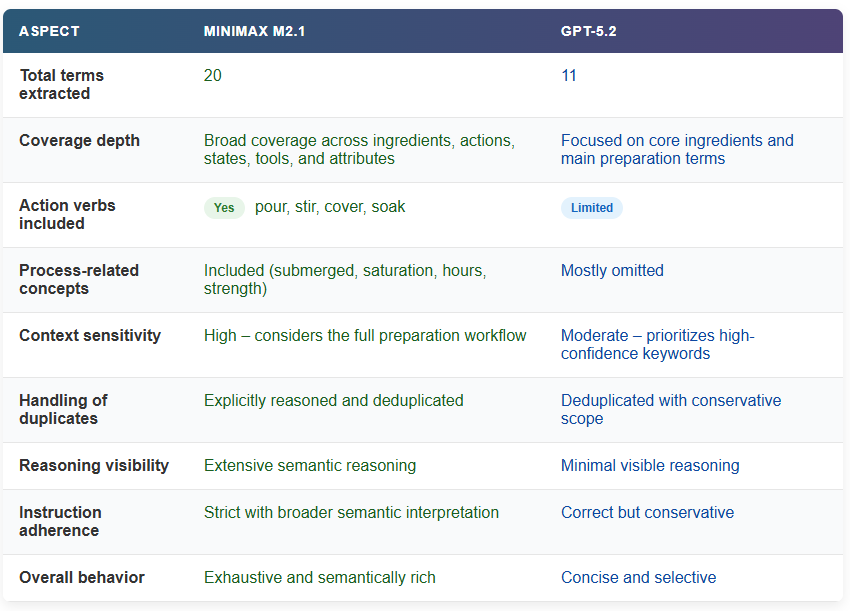
When comparing the outputs, MiniMax M2.1 produces a noticeably broader and more granular set of coffee-related terms than GPT-5.2. M2.1 identifies not only core nouns like coffee, beans, and water, but also preparation actions (pour, stir, cover), process-related states (submerged, soak), and contextual attributes (cold, coarse, strength, hours). 

This indicates a deeper semantic pass over the text, where the model reasons through the entire preparation workflow rather than extracting only the most obvious keywords.

This difference is also reflected in the reasoning process. M2.1 explicitly analyzes context, resolves edge cases (such as borrowed English terms like Cold Brew), considers duplicates, and deliberates on whether certain adjectives or verbs qualify as coffee-related before finalizing the list. GPT-5.2, by contrast, delivers a shorter and more conservative output focused on high-confidence terms, with less visible reasoning depth. 

Together, this highlights M2.1’s stronger instruction adherence and semantic coverage, especially for tasks that require careful filtering, translation, and strict output control.

The post appeared first on .

Read More

A Coding Guide to Build an Autonomous Multi-Agent Logistics System with Route Planning, Dynamic Auctions, and Real-Time Visualization Using Graph-Based Simulation


In this tutorial, we build an advanced, fully autonomous logistics simulation in which multiple smart delivery trucks operate within a dynamic city-wide road network. We design the system so that each truck behaves as an agent capable of bidding on delivery orders, planning optimal routes, managing battery levels, seeking charging stations, and maximizing profit through self-interested decision-making. Through each code snippet, we explore how agentic behaviors emerge from simple rules, how competition shapes order allocation, and how a graph-based world enables realistic movement, routing, and resource constraints. Check out the .

import networkx as nx
import matplotlib.pyplot as plt
import random
import time
from IPython.display import clear_output
from dataclasses import dataclass, field
from typing import List, Dict, Optional


NUM_NODES = 30
CONNECTION_RADIUS = 0.25
NUM_AGENTS = 5
STARTING_BALANCE = 1000
FUEL_PRICE = 2.0
PAYOUT_MULTIPLIER = 5.0
BATTERY_CAPACITY = 100
CRITICAL_BATTERY = 25


@dataclass
class Order:
   id: str
   target_node: int
   weight_kg: int
   payout: float
   status: str = "pending"


class AgenticTruck:
   def __init__(self, agent_id, start_node, graph, capacity=100):
       self.id = agent_id
       self.current_node = start_node
       self.graph = graph
       self.battery = BATTERY_CAPACITY
       self.balance = STARTING_BALANCE
       self.capacity = capacity
       self.state = "IDLE"
       self.path: List[int] = []
       self.current_order: Optional[Order] = None
       self.target_node: int = start_node

We set up all the core building blocks of the simulation, including imports, global parameters, and the basic data structures. We also define the AgenticTruck class and initialize key attributes, including position, battery, balance, and operating state. We lay the foundation for all agent behaviors to evolve. Check out the .

 def get_path_cost(self, start, end):
       try:
           length = nx.shortest_path_length(self.graph, start, end, weight='weight')
           path = nx.shortest_path(self.graph, start, end, weight='weight')
           return length, path
       except nx.NetworkXNoPath:
           return float('inf'), []


   def find_nearest_charger(self):
       chargers = [n for n, attr in self.graph.nodes(data=True) if attr.get('type') == 'charger']
       best_charger = None
       min_dist = float('inf')
       best_path = []
       for charger in chargers:
           dist, path = self.get_path_cost(self.current_node, charger)
           if dist < min_dist:
               min_dist = dist
               best_charger = charger
               best_path = path
       return best_charger, best_path


   def calculate_bid(self, order):
       if order.weight_kg > self.capacity:
           return float('inf')
       if self.state != "IDLE" or self.battery < CRITICAL_BATTERY:
           return float('inf')
       dist_to_target, _ = self.get_path_cost(self.current_node, order.target_node)
       fuel_cost = dist_to_target * FUEL_PRICE
       expected_profit = order.payout - fuel_cost
       if expected_profit < 10:
           return float('inf')
       return dist_to_target


   def assign_order(self, order):
       self.current_order = order
       self.state = "MOVING"
       self.target_node = order.target_node
       _, self.path = self.get_path_cost(self.current_node, self.target_node)
       if self.path: self.path.pop(0)


   def go_charge(self):
       charger_node, path = self.find_nearest_charger()
       if charger_node is not None:
           self.state = "TO_CHARGER"
           self.target_node = charger_node
           self.path = path
           if self.path: self.path.pop(0)

We implement advanced decision-making logic for the trucks. We calculate shortest paths, identify nearby charging stations, and evaluate whether an order is profitable and feasible. We also prepare the truck to accept assignments or proactively seek charging when needed. Check out the .

 def step(self):
       if self.state == "IDLE" and self.battery < CRITICAL_BATTERY:
           self.go_charge()


       if self.state == "CHARGING":
           self.battery += 10
           self.balance -= 5
           if self.battery >= 100:
               self.battery = 100
               self.state = "IDLE"
           return


       if self.path:
           next_node = self.path[0]
           edge_data = self.graph.get_edge_data(self.current_node, next_node)
           distance = edge_data['weight']
           self.current_node = next_node
           self.path.pop(0)
           self.battery -= (distance * 2)
           self.balance -= (distance * FUEL_PRICE)


           if not self.path:
               if self.state == "MOVING":
                   self.balance += self.current_order.payout
                   self.current_order.status = "completed"
                   self.current_order = None
                   self.state = "IDLE"
               elif self.state == "TO_CHARGER":
                   self.state = "CHARGING"

We manage the step-by-step actions of each truck as the simulation runs. We handle battery recharging, financial impacts of movement, fuel consumption, and order completion. We ensure that agents transition smoothly between states, such as moving, charging, and idling. Check out the .

class Simulation:
   def __init__(self):
       self.setup_graph()
       self.setup_agents()
       self.orders = []
       self.order_count = 0


   def setup_graph(self):
       self.G = nx.random_geometric_graph(NUM_NODES, CONNECTION_RADIUS)
       for (u, v) in self.G.edges():
           self.G.edges[u, v]['weight'] = random.uniform(1.0, 3.0)
       for i in self.G.nodes():
           r = random.random()
           if r < 0.15:
               self.G.nodes[i]['type'] = 'charger'
               self.G.nodes[i]['color'] = 'red'
           else:
               self.G.nodes[i]['type'] = 'house'
               self.G.nodes[i]['color'] = '#A0CBE2'


   def setup_agents(self):
       self.agents = []
       for i in range(NUM_AGENTS):
           start_node = random.randint(0, NUM_NODES-1)
           cap = random.choice([50, 100, 200])
           self.agents.append(AgenticTruck(i, start_node, self.G, capacity=cap))


   def generate_order(self):
       target = random.randint(0, NUM_NODES-1)
       weight = random.randint(10, 120)
       payout = random.randint(50, 200)
       order = Order(id=f"ORD-{self.order_count}", target_node=target, weight_kg=weight, payout=payout)
       self.orders.append(order)
       self.order_count += 1
       return order


   def run_market(self):
       for order in self.orders:
           if order.status == "pending":
               bids = {agent: agent.calculate_bid(order) for agent in self.agents}
               valid_bids = {k: v for k, v in bids.items() if v != float('inf')}
               if valid_bids:
                   winner = min(valid_bids, key=valid_bids.get)
                   winner.assign_order(order)
                   order.status = "assigned"

We create the simulated world and orchestrate agent interactions. We generate the graph-based city, spawn trucks with varying capacities, and produce new delivery orders. We also implement a simple market where agents bid for tasks based on profitability and distance. Check out the .

  def step(self):
       if random.random() < 0.3:
           self.generate_order()
       self.run_market()
       for agent in self.agents:
           agent.step()


   def visualize(self, step_num):
       clear_output(wait=True)
       plt.figure(figsize=(10, 8))
       pos = nx.get_node_attributes(self.G, 'pos')
       node_colors = [self.G.nodes[n]['color'] for n in self.G.nodes()]
       nx.draw(self.G, pos, node_color=node_colors, with_labels=True, node_size=300, edge_color='gray', alpha=0.6)


       for agent in self.agents:
           x, y = pos[agent.current_node]
           jitter_x = x + random.uniform(-0.02, 0.02)
           jitter_y = y + random.uniform(-0.02, 0.02)
           color = 'green' if agent.state == "IDLE" else ('orange' if agent.state == "MOVING" else 'red')
           plt.plot(jitter_x, jitter_y, marker='s', markersize=12, color=color, markeredgecolor='black')
           plt.text(jitter_x, jitter_y+0.03, f"A{agent.id}n${int(agent.balance)}n{int(agent.battery)}%",
                    fontsize=8, ha='center', fontweight='bold', bbox=dict(facecolor='white', alpha=0.7, pad=1))


       for order in self.orders:
           if order.status in ["assigned", "pending"]:
               ox, oy = pos[order.target_node]
               plt.plot(ox, oy, marker='*', markersize=15, color='gold', markeredgecolor='black')


       plt.title(f"Graph-Based Logistics Swarm | Step: {step_num}nRed Nodes = Chargers | Gold Stars = Orders", fontsize=14)
       plt.show()


print("Initializing Advanced Simulation...")
sim = Simulation()


for t in range(60):
   sim.step()
   sim.visualize(t)
   time.sleep(0.5)


print("Simulation Finished.")

We step through the full simulation loop and visualize the logistics swarm in real time. We update agent states, draw the network, display active orders, and animate each truck’s movement. By running this loop, we observe the emergent coordination and competition that define our multi-agent logistics ecosystem.

In conclusion, we saw how the individual components, graph generation, autonomous routing, battery management, auctions, and visualization, come together to form a living, evolving system of agentic trucks. We watch as agents negotiate workloads, compete for profitable opportunities, and respond to environmental pressures such as distance, fuel costs, and charging needs. By running the simulation, we observe emergent dynamics that mirror real-world fleet behavior, providing a powerful sandbox for experimenting with logistics intelligence.


Check out the . Also, feel free to follow us on  and don’t forget to join our  and Subscribe to . Wait! are you on telegram? 

The post appeared first on .

Read More
This AI Paper from Stanford and Harvard Explains Why Most ‘Agentic AI’ Systems Feel Impressive in Demos and then Completely Fall Apart in Real Use

This AI Paper from Stanford and Harvard Explains Why Most ‘Agentic AI’ Systems Feel Impressive in Demos and then Completely Fall Apart in Real Use


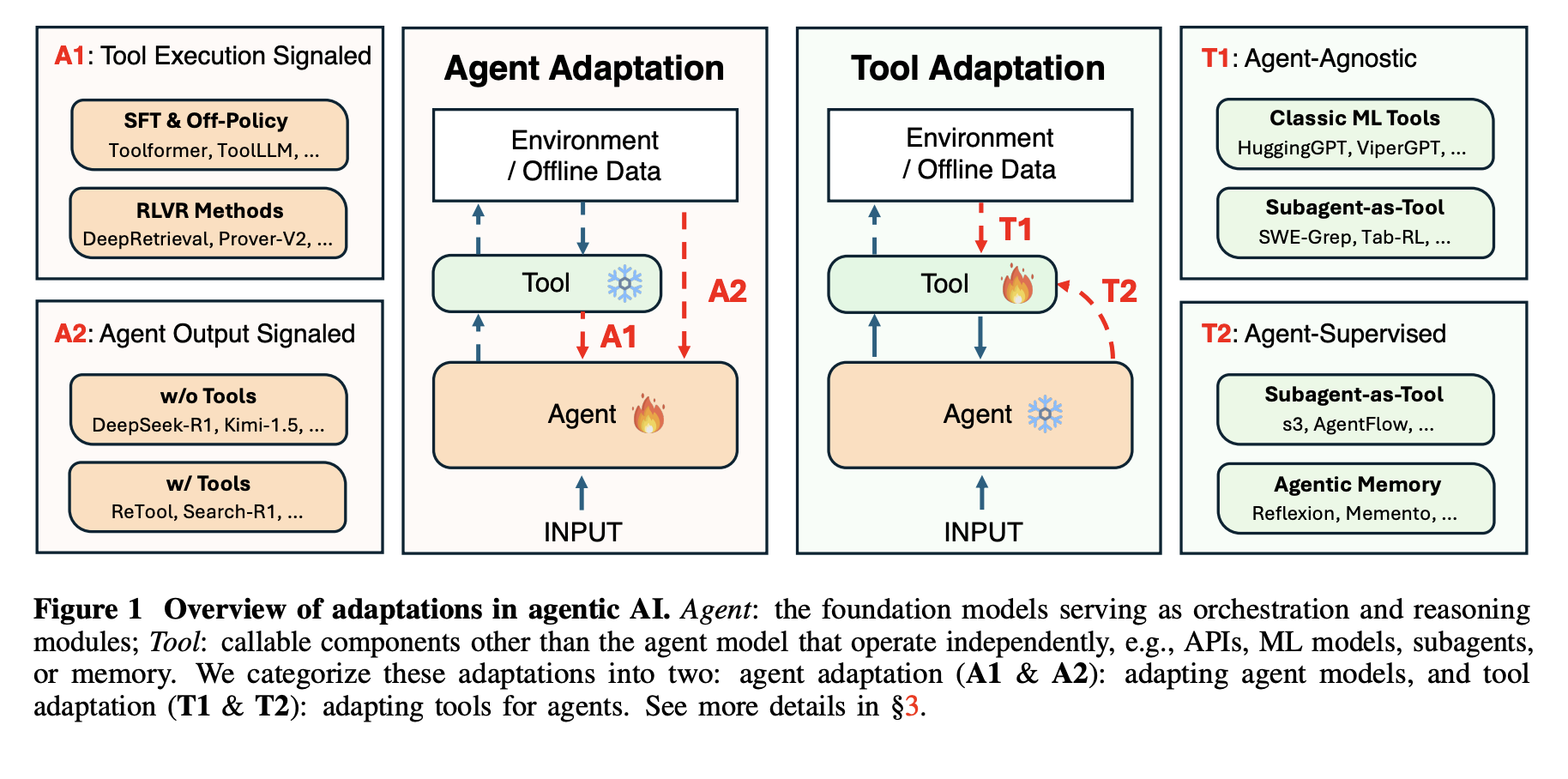
Agentic AI systems sit on top of large language models and connect to tools, memory, and external environments. They already support scientific discovery, software development, and clinical research, yet they still struggle with unreliable tool use, weak long horizon planning, and poor generalization. The latest research paper ‘Adaptation of Agentic AI‘ from Stanford, Harvard, UC Berkeley, Caltech proposes a unified view of how these systems should adapt and maps existing methods into a compact, mathematically defined framework.

How this research paper models an agentic AI system?

The research survey models an agentic AI system as a foundation model agent along with 3 key components. A planning module decomposes goals into sequences of actions, using static procedures such as Chain-of-Thought and Tree-of-Thought, or dynamic procedures such as ReAct and Reflexion that react to feedback. A tool use module connects the agent to web search engines, APIs, code execution environments, Model Context Protocols, and browser automation. A memory module stores short term context and long term knowledge, accessed through retrieval augmented generation. Adaptation changes prompts or parameters for these components using supervised fine tuning, preference based methods such as Direct Preference Optimization, reinforcement learning methods such as Proximal Policy Optimization and Group Relative Policy Optimization, and parameter efficient techniques such as low rank adaptation.

https://arxiv.org/pdf/2512.16301

Four adaptation paradigms

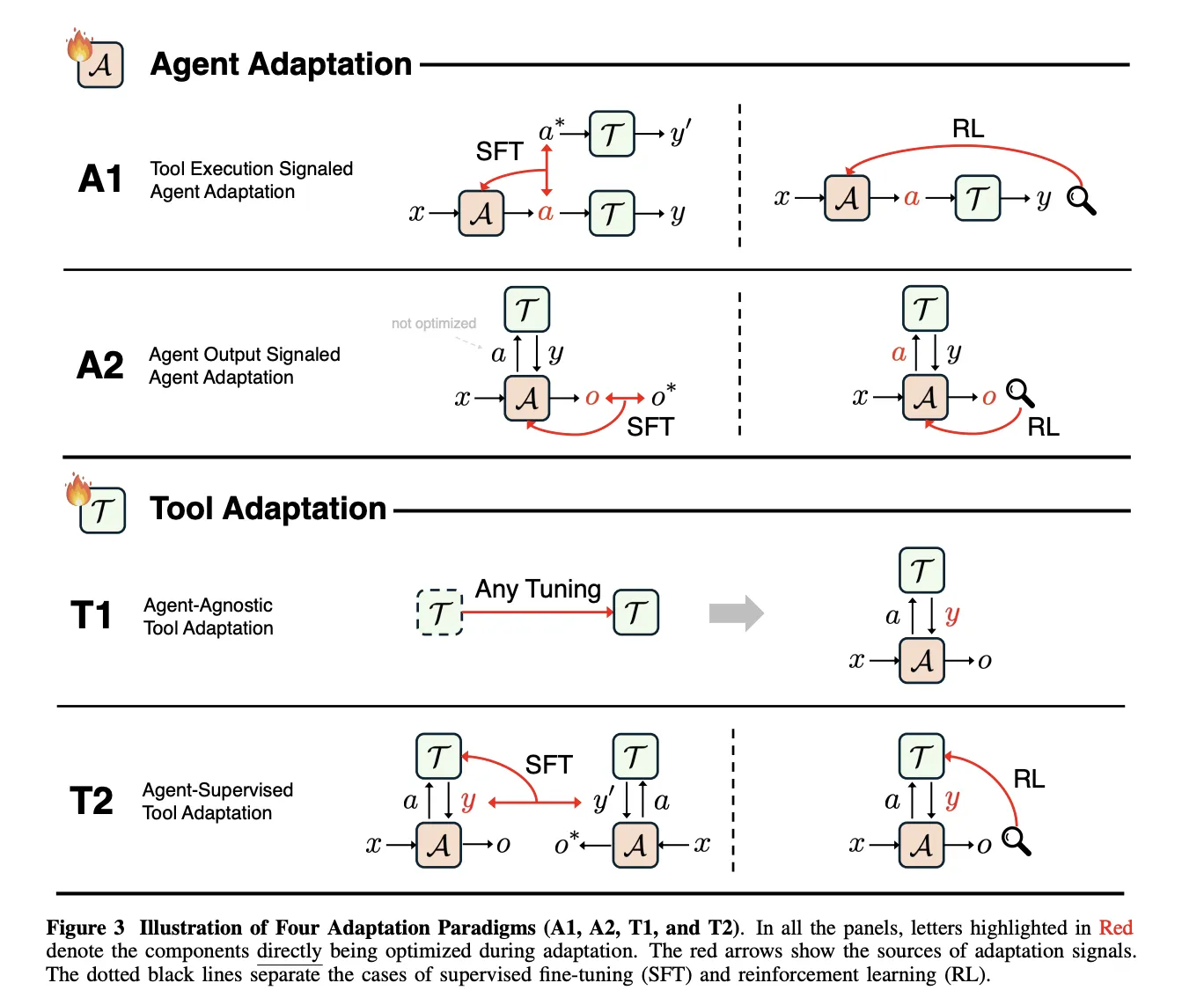
The framework defines 4 adaptation paradigms by combining 2 binary choices. The first dimension is the target, agent adaptation versus tool adaptation. The second dimension is the supervision signal, tool execution versus agent output. This yields A1 and A2 for adapting the agent, and T1 and T2 for adapting tools.

A1, Tool Execution Signaled Agent Adaptation, optimizes the agent using feedback derived from tool execution. A2, Agent Output Signaled Agent Adaptation, optimizes the agent using a signal defined only on its final outputs. T1, Agent-Agnostic Tool Adaptation, optimizes tools without referring to a particular agent. T2, Agent-Supervised Tool Adaptation, optimizes tools under supervision from a fixed agent.

https://arxiv.org/pdf/2512.16301

A1, learning from verifiable tool feedback

In A1, the agent receives an input x, produces a structured tool call a, the tools return a result y, and the learning objective O_tool measures tool success, for example execution correctness or retrieval quality. The paper covers both supervised imitation of successful tool trajectories and reinforcement learning that uses verifiable tool outcomes as reward.

Toolformer, ToolAlpaca, and Gorilla illustrate supervised A1 methods, since each uses execution results of real tools to construct or filter training traces before imitation. All of them keep the supervision signal defined at the tool behavior level, not at the final answer level.

DeepRetrieval is a central A1 reinforcement learning example. It frames query reformulation as a Markov decision process where the state is the user query, the action is a rewritten query, and the reward combines retrieval metrics such as Recall and nDCG, a format term, and, for text to SQL, SQL execution accuracy. The policy is trained with KL regularized Proximal Policy Optimization and the same objective covers literature search, corpus question answering, and text to SQL.

A2, learning from final agent outputs

A2 covers cases where the optimization objective O_agent depends only on the final output o produced by the agent, even when the agent uses tools internally. The survey shows that supervising only o is not enough to teach tools, because the agent can ignore tools and still improve likelihood. Effective A2 systems therefore combine supervision on tool calls with supervision on final answers, or assign sparse rewards such as exact match accuracy to o and propagate them back through the full trajectory.

T1, agent agnostic tool training

T1 freezes the main agent and optimizes tools so that they are broadly reusable. The objective O_tool depends only on tool outputs and is measured by metrics such as retrieval accuracy, ranking quality, simulation fidelity, or downstream task success. A1 trained search policies, such as DeepRetrieval, can later be reused as T1 tools inside new agentic systems without modifying the main agent.

T2, tools optimized under a frozen agent

T2 assumes a powerful but fixed agent A, which is common when the agent is a closed source foundation model. The tool executes calls and returns results that the agent then uses to produce o. The optimization objective again lives on O_agent, but the trainable parameters belong to the tool. The paper describes quality weighted training, target based training, and reinforcement learning variants that all derive learning signals for the tool from the final agent outputs.

The survey treats long term memory as a special case of T2. Memory is an external store written and read through learned functions, and the agent remains frozen. Recent T2 systems include s3, which trains a 7 billion parameter searcher that maximizes a Gain Beyond RAG reward defined by a frozen generator, and AgentFlow, which trains a planner to orchestrate mostly frozen Qwen2.5 based modules using Flow GRPO.

https://arxiv.org/pdf/2512.16301

Key Takeaways

  • The research defines a precise 4 paradigm framework for adapting agentic AI by crossing 2 dimensions, whether adaptation targets the agent or tools, and whether the supervision signal comes from tool execution or from final agent outputs.
  • A1 methods such as Toolformer, ToolAlpaca, Gorilla, and DeepRetrieval adapt the agent directly from verifiable tool feedback, including retrieval metrics, SQL execution accuracy, and code execution results, often optimized with KL regularized Proximal Policy Optimization.
  • A2 methods optimize the agent from signals on final outputs, for example answer accuracy, and the paper shows that systems must still supervise tool calls or propagate sparse rewards through full trajectories, otherwise the agent can ignore tools while still improving likelihood.
  • T1 and T2 shift learning to tools and memory, T1 trains generally useful retrievers, searchers, and simulators without a specific agent in mind, while T2 adapts tools under a frozen agent, as in s3 and AgentFlow where a fixed generator supervises a learned searcher and planner.
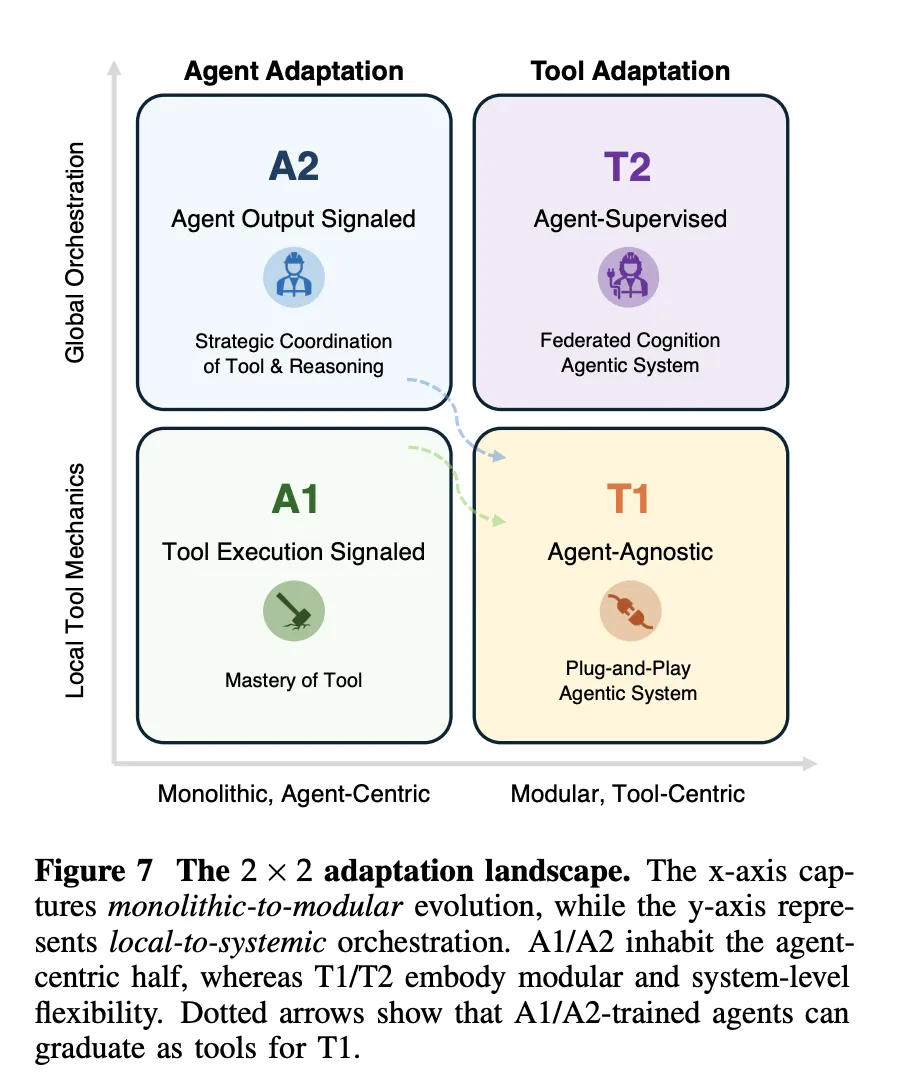
  • The research team introduce an adaptation landscape that relates monolithic versus modular and local versus systemic control, and they argue that practical systems will combine rare A1 or A2 updates on a strong base model with frequent T1 and T2 adaptation of retrievers, search policies, simulators, and memory for robustness and scalability.

Check out the  and . Also, feel free to follow us on  and don’t forget to join our  and Subscribe to . Wait! are you on telegram? 

The post appeared first on .

Read More