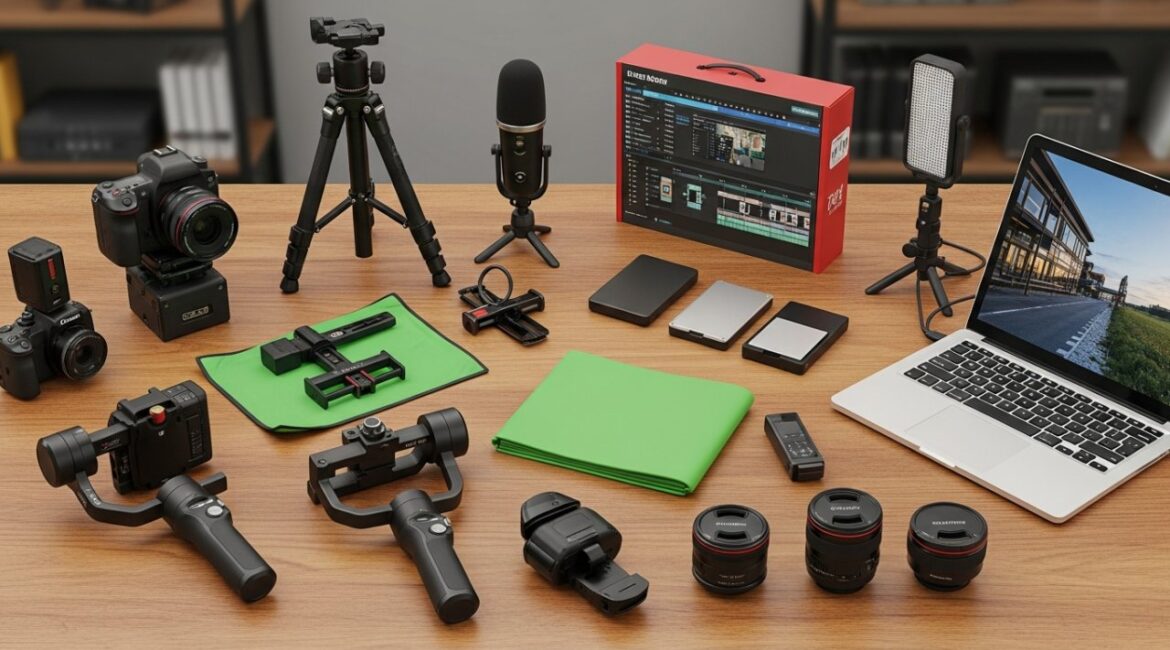
When you’re immersing yourself in video creation and editing, having the right tools is vital for achieving high-quality results. You need a reliable camera to capture clear visuals, along with an external microphone to improve audio quality. Effective lighting solutions will enhance your footage’s overall look, whereas tripods and gimbals guarantee stability. Plus, choosing the right editing software is key for post-production. Let’s explore these important tools to boost your video projects.
Key Takeaways

- A high-quality camera, like a mirrorless or DSLR model, is essential for capturing professional-grade video footage.
- External microphones significantly enhance audio quality, making them crucial for engaging video content.
- Implementing a three-point lighting setup ensures effective illumination and enhances viewer perception of your videos.
- Reliable video editing software, such as Adobe Premiere Pro or DaVinci Resolve, is vital for refining and enhancing your footage.
- Ergonomic editing chairs and multiple monitor setups improve comfort and productivity during long editing sessions.
Reliable Camera for Capturing Visuals

When you’re looking to capture high-quality visuals, choosing the right camera is crucial, especially since technology has advanced considerably in recent years.
Smartphones can shoot videos at resolutions up to 4K, but for serious work, a reliable camera like a mirrorless or DSLR model is often better. These options excel in low-light conditions and offer interchangeable lenses, giving you creative flexibility.
Recommended models include the Panasonic Lumix GH6 for advanced features, the compact Canon Powershot G7 X Mark III, and the Sony ZV-1F, designed for vlogging.
Make sure your camera records at least 1080p to meet professional standards. You can always use a video body editor online free or free video recording and editing software to improve your footage.
External Microphone for Superior Audio Quality
Capturing high-quality visuals is only part of the equation in video production; superior audio quality is equally important for creating engaging content.
External microphones greatly improve audio quality, as built-in mics often capture poor sound, negatively impacting viewer experience. You’ll find two main types of external microphones: dynamic microphones, which excel with high-volume sources, and condenser microphones, better suited for nuanced audio in quieter settings.
Popular options include the Rode VideoMic Pro, known for its directional audio capture, and the compact Sennheiser MKE 400, which delivers excellent sound quality.
When choosing an external microphone, consider features like transducer type, polar pattern, and compatibility with your gear to guarantee peak performance in your video content creation.
Effective Lighting Solutions
Effective lighting solutions play a vital role in video production, influencing how your content is perceived by viewers. Quality lighting greatly improves your videos, so at least one dedicated light aimed directly at your subject is fundamental for professional results.
A three-point lighting setup, consisting of a key light, fill light, and back light, is recommended for ideal illumination and depth. Utilizing LED lights, like the GVM RGB LED Studio Kit or Godox SL-60, allows you to adjust brightness and color temperature, making them versatile for various environments.
When selecting lighting equipment, consider options like softboxes or diffusers to soften harsh shadows, resulting in a more flattering look. Proper lighting not only enhances visual quality but also reduces post-production time.
Tripods and Gimbals for Stability

Achieving stable footage is vital for any video project, as it directly impacts the viewer’s experience. To guarantee video stability, using tripods and gimbals is important.
Tripods are fundamental tools for stabilizing cameras or smartphones, preventing shakiness and delivering smooth footage. They come in various types, including extendable, compact, phone, and flexible models, allowing you to choose based on your filming needs. Lightweight options like the Peak Design Travel Tripod and Manfrotto MT190X3 are particularly popular for their portability.
Gimbals, conversely, are advanced devices that greatly reduce camera shake. Models like the Zhiyun Crane M3 and DJI Osmo Mobile 4 provide improved stability and control, making them ideal for both moving and stationary shots.
Video Editing Software Options

In regard to video editing, selecting the right software can greatly influence your project’s outcome.
For professionals, Adobe Premiere Pro is the industry standard, offering advanced features for collaboration and color correction.
If you’re an enthusiast, consider CyberLink PowerDirector, which provides a user-friendly experience and multicam editing.
Apple users can turn to iMovie, designed for beginners with tools like chroma-keying.
For those looking for free video editing for TikTok, DaVinci Resolve presents a robust option with a generous free version known for its effects and fast rendering.
Finally, Wondershare Filmora is perfect for amateurs seeking strong yet straightforward techniques on how to create a video without getting overwhelmed.
Choose the software that best fits your needs and skill level.
Planning and Organization Tools
When you’re planning a video, using project management software can really streamline your process and improve communication within your team.
Storyboarding applications help you visualize your scenes and sequences, making it easier to outline your shots before you start filming.
Project Management Software
Project management software plays a crucial role in organizing video production workflows, as it allows teams to collaborate effectively on tasks, deadlines, and asset management.
Tools like Trello, Asana, and Monday.com provide visual task boards, timelines, and calendar views to help you track progress and improve accountability among team members.
Many of these platforms integrate with cloud storage services, making it easy to share video files and project documents directly within the software.
Features such as Gantt charts and Kanban boards aid in visualizing project timelines, allowing you to manage resources and prioritize tasks efficiently.
Storyboarding Applications
Storyboarding applications play a vital role in the video production process by allowing creators to visualize scenes and sequences before filming begins.
These tools facilitate a structured approach, enhancing storytelling clarity and organization. Many storyboarding applications offer customizable templates and drag-and-drop functionality, making it easy for you to arrange shots and plan transitions effectively.
Applications like Storyboarder and Canva provide intuitive interfaces for both beginners and experienced creators, enabling quick adjustments and collaboration. Some of these tools integrate seamlessly with video editing software, improving overall workflow efficiency.
Storage Solutions: Hard Drives and Cloud
To effectively manage large video files, it’s vital to take into account the right storage solutions, as internal drives often struggle to keep up with the demands of video editing.
Consider these options for your video projects:
- External Hard Drives: These provide ample space for your large video files, ensuring your internal drive remains free.
- Solid State Drives (SSDs): SSDs offer faster and more reliable performance than traditional Hard Disk Drives (HDDs), making them ideal for editing tasks.
- Standard Configuration: A typical setup includes a 512GB SSD for software and a 1TB HDD for larger files.
- Cloud Storage: Services like Google Drive and Dropbox enable easy collaboration and file access from anywhere.
Choosing the right storage solutions is vital for efficient video editing.
Monitors for Video Editing
When choosing a monitor for video editing, you’ll want to focus on resolution and color accuracy, as these factors greatly impact your editing experience.
A minimum of Full HD resolution is crucial, but a 4K monitor is often preferable for high-resolution projects, ensuring crisp visuals.
Furthermore, consider the size and panel technology options, as a larger screen with the right panel can provide better color representation and improve your overall workflow.
Resolution and Color Accuracy
In video editing, having the right monitor is fundamental for achieving accurate color representation and resolution.
Here are key features to take into account for ideal resolution and color accuracy:
- Minimum Full HD (1920×1080) – This is vital for standard editing, but opt for 4K displays for high-resolution footage to capture finer details.
- Wide Color Gamut – Monitors covering DCI-P3 allow you to see a broader range of colors, enhancing your editing precision.
- Monitor Calibration – Regular calibration guarantees colors and contrasts are represented accurately, preventing misleading edits.
- IPS Panels – These provide superior color reproduction and wider viewing angles compared to TN panels, enhancing your overall editing experience.
Size and Screen Real Estate
Having the right monitor size can markedly improve your video editing workflow, allowing you to manage multiple elements on screen without feeling cramped.
For effective video editing, a minimum Full HD (1920×1080) resolution monitor is vital, but opting for 4K is preferable for precise editing and color grading. A monitor that covers a wide color gamut, particularly DCI-P3, improves color accuracy, significant when using video editing software.
If you’re a video editor online, consider multiple monitor setups for increased screen real estate, enabling you to display timelines, preview windows, and tools simultaneously.
Furthermore, choose a monitor for video editing with adjustable height and tilt features to promote ergonomic comfort during long sessions, reducing strain and boosting productivity.
Panel Technology Options
Choosing the right panel technology is crucial for video editing, as it directly impacts color accuracy and viewing experience.
As a video editor, you’ll want to prioritize these features:
- Resolution: Aim for at least Full HD (1920×1080), but 4K is preferred for high-resolution footage.
- Color Gamut: Select monitors covering DCI-P3 color space for accurate color representation.
- Refresh Rate: Consider a standard 60Hz, though higher rates improve smooth playback for dynamic content.
- IPS Technology: Opt for monitors with IPS technology for superior color accuracy and wider viewing angles.
Investing in the right monitor not only complements your video editing software but also improves your overall workflow, especially with dual-monitor setups for increased screen real estate.
Accessories: Keyboards and Headphones
When you’re plunging into video creation and editing, the right accessories, particularly keyboards and headphones, can greatly improve your workflow and audio quality.
Specialized editing keyboards, like the LogicKeyboard Astra, feature color-coded keys customized for software such as Adobe Premiere Pro, which boosts efficiency and reduces the learning curve.
Meanwhile, investing in high-quality headphones, like the Beyerdynamic DT 770 Pro, is vital for accurate audio monitoring during editing. These headphones provide comfort for extended sessions and help you detect subtle audio issues.
Furthermore, lower impedance models, such as the Sony MDR-7506, offer convenience for on-the-go editing. Quality studio headphones guarantee precise adjustments, which are fundamental for producing professional-grade videos.
Editing Chair for Comfort and Productivity

When you’re editing videos for long stretches, the right chair can make all the difference in your comfort and productivity.
An ergonomic design with adjustable height features helps support your posture, reducing strain on your back and neck.
Ergonomic Design Benefits
An ergonomic editing chair not just supports your posture but also improves your overall productivity during long editing sessions. By investing in one, you can experience several benefits that elevate your work experience:
- Proper Posture: The design encourages alignment, reducing the risk of back pain.
- Adjustable Lumbar Support: Tailors to your body, promoting comfort and alignment.
- Improved Circulation: Enhanced blood flow helps reduce fatigue, keeping you energized.
- Dynamic Movement: Allows you to shift positions easily, minimizing repetitive strain injuries.
With an ergonomic editing chair, you can maintain focus and efficiency, ultimately leading to a more productive and enjoyable video editing experience.
Prioritizing comfort is crucial for your long-term health and productivity.
Adjustable Height Features
Adjustable height features in editing chairs play a significant role in enhancing comfort and productivity during long video editing sessions.
Choosing adjustable height editing chairs allows you to customize your seating position, which is crucial for maintaining an ergonomic posture. An ergonomic chair, like the Duramont Ergonomic Office Chair, offers lumbar support and a high back to reduce fatigue.
Furthermore, the HAG Capisco Adjustable Standing Desk Chair promotes both sitting and standing, encouraging movement as you work. Research shows that using an adjustable chair can lower the risk of musculoskeletal disorders, common for those at desks for extended periods.
Frequently Asked Questions

What Tool Is Best for Video Editing?
Choosing the best tool for video editing depends on your needs.
For professionals, Adobe Premiere Pro offers advanced features but requires a subscription.
If you’re an enthusiast, CyberLink PowerDirector provides a user-friendly interface and fast rendering.
For Apple users, iMovie simplifies editing with strong functions.
DaVinci Resolve is great for both pros and amateurs owing to its free version and advanced color correction.
Beginners might prefer Wondershare Filmora for its ease of use and extensive effects.
What Equipment Is Required for Video Editing?
For effective video editing, you need a robust computer, ideally with at least 16GB of RAM and a strong graphics card for handling high-resolution footage.
A reliable storage setup, combining a 512GB SSD for speed and a 1TB HDD for capacity, is crucial.
Furthermore, high-resolution monitors help you see color accuracy, whereas quality audio equipment guarantees you monitor sound effectively.
Finally, proper lighting equipment can greatly improve the overall video quality you produce.
What Are 321 Rules of Video Editing?
The 321 rule of video editing emphasizes data safety.
You should keep three copies of your original video file, store them in two different formats, and maintain one copy off-site.
This approach minimizes the risks of data loss from corruption, accidental deletion, or hardware failure.
What Are the 5 Stages of Video Editing?
The five stages of video editing are crucial for creating a polished final product.
First, you import footage into the editing software.
Next, during the rough cut, you arrange clips into a preliminary sequence.
The fine cut follows, where you trim sections and guarantee smooth shifts.
Then, you perform color grading to improve visual aesthetics.
Finally, you export the project to render it into a specific format for distribution, meeting platform requirements.
Conclusion

In summary, equipping yourself with the right tools is important for effective video creation and editing. From reliable cameras and external microphones to adequate lighting and stabilizing equipment, each element plays a key role in enhancing your final product. Investing in quality editing software, proper storage solutions, and ergonomic accessories further streamlines your workflow. By prioritizing these fundamentals, you can greatly improve both the quality of your videos and your overall editing experience.
Image via Google Gemini
This article, “10 Essential Tools for Video Creation and Editing” was first published on Small Business Trends